How to automatically show random last video from youtube channel

Surprisingly YouTube still don’t have a way to easily embed only your latest YouTube video onto your site so that every time you upload a new video it automatically updates on your site.  

This tutorial will show you how to embed your latest video (or random) from YouTube to Blogger so it automatically updates.

"This script also work on any site with javascript support"

 add a gadget on blogger layout, enter this html code

<iframe id="youtube-frame" style="width:230px"; height: 150px;" frameborder="0" allowfullscreen></iframe>


then add this script bellow that html code:

fullscript :

<script>

function frx_ytb_show(autoPlay, videoID) {

    var youtube = document.getElementById("youtube-frame");

    if (youtube) {

        youtube.setAttribute("id", videoID);

        youtube.style["position"] = "relative";

        if (autoPlay) youtube.setAttribute("src", "https://www.youtube.com/embed/" + youtube.id + "?autoplay=1&autohide=1&border=0&wmode=opaque&enablejsapi=1");

        else youtube.setAttribute("src", "https://www.youtube.com/embed/" + youtube.id + "?autohide=1&border=0&wmode=opaque");

    }


function randomRange(l, h) {

    var range = (h - l);

    var random = Math.floor(Math.random() * range);

    if (random === 0) { random += 1; }

    return l + random;

}


$(document).ready(function() {

  var randomID = randomRange(5,0);

  $.get(

    "https://www.googleapis.com/youtube/v3/search",{

      part : 'snippet', 

      channelId : 'YOUR CHANNEL ID',

      type : 'video',

      key: 'YOUR YOUTUBE KEY'},

      function(data) {

        $.each( data.items, function( i, item ) {

          if(i == randomID){ frx_ytb_show(false, item.id.videoId); }

        })

      }

  );

});

</script>


explanation :

1. Script to show youtube frame

<script>

function frx_ytb_show(autoPlay, videoID) {

    var youtube = document.getElementById("youtube-frame");

    if (youtube) {

        youtube.setAttribute("id", videoID);

        youtube.style["position"] = "relative";

        if (autoPlay) youtube.setAttribute("src", "https://www.youtube.com/embed/" + youtube.id + "?autoplay=1&autohide=1&border=0&wmode=opaque&enablejsapi=1");

        else youtube.setAttribute("src", "https://www.youtube.com/embed/" + youtube.id + "?autohide=1&border=0&wmode=opaque");

    }

</script>

2. Script to Get Random Number

<script>

function randomRange(l, h) {

    var range = (h - l);

    var random = Math.floor(Math.random() * range);

    if (random === 0) {

        random += 1;

    }

    return l + random;

}

</script>

3. Script to get the list video from your channel and randomly show one video on the gadget.

<script>

$(document).ready(function() {

  var randomID = randomRange(5,0);

  $.get(

    "https://www.googleapis.com/youtube/v3/search",{

      part : 'snippet', 

      channelId : 'YOUR CHANNEL ID',

      type : 'video',

      key: 'YOUR YOUTUBE KEY'},

      function(data) {

        $.each( data.items, function( i, item ) {

          if(i == randomID){ frx_ytb_show(false, item.id.videoId); }

        })

      }

  );

});

</script>

note :

- replace "YOUR CHANNEL ID" with you channel id 

- replace "YOUR YOUTUBE KEY" with your youtube key

this is the video how to get your youtube api key v3 


4. you need to add jquery library for the function number 3. add this to blogger your html template inside <head></head> tag :

   <script src='https://ajax.googleapis.com/ajax/libs/jquery/1.4.2/jquery.min.js'/>

here is the complete video tutorial on youtube :


How to automatically redirect Blogger blog to another blog or website

You can redirect your specific post URL to another post or page, all 301 or 302 redirection within your blog. 

That will be useful for redirecting 404 error pages and broken links; however with that you cannot redirect homepage to any particular URL. Here we will show you how to automatically redirect Blogger blog to another blog or website or any URL. So with this technique you can redirect your Blogger Homepage or any particular page to external websites.

This will be useful if you have just migrated to new domain with new blogging platform. Usually you won’t get much traffic to your new blog when you just shifted. Also your old blog will have some decent traffic flow from organic search results as well as from backlinks. So by using this method you can drive traffic from your old blog to your new blog and also it passes all the ranking factors.


Redirect Page To Page 

- go to settings::Errors and redirects::Custom redirects

- click Custom Redirect and add page that you want to redirect

Note:

There is a permanent option below the To URL, you can check the permanent option to setup 301 redirection on Blogger, leave it unchecked to create 302 redirection on Blogger.

Do not enter the full URL in the From or To field. Just omit the main domain name in the full URL and enter sub directory name and file name, such as /2021/02/redirect-blog-URL.html. Also you can not redirect Blogger URL or post to external links.


Using JavaScript

  1. Login to your Blogger dashboard
  2. Go to template and click edit HTML
  3. Now you can see template codes. Press CTRL + f and then find <head>
  4. Now add the following code between <head> and </head>
<script>
window.location="http://www.yourdomain.com";
</script>

dont forget to replace the red text with your domain.

this method will redirect the whole pages to yourdomain.com


Redirect with custom filter

You can filter which page that will be redirect to your domain.

<script>

var s = window.location.href;

if(s.indexOf("windows") != -1)

    window.location = "http://www.yourdomain.com/windows.html";

</script>

 this method will redirect all pages with url : "http(s)://*windows%" to yourdomain.com/windows.html


Redirect Page With Parameter

You can redirect to another domain with the same page and parameter. 

<script>

  var s = window.location.pathname;

  var ar = s.split('/');

  s = 'http://www.yourdomain.com/'+ar[ar.length-1];

  window.location = s+window.location.search;

</script> 

This method will redirect all pages to another domain with the same parameter.

eg: https://frxangelz.blogspot.com/2021-01-01/test.html?act=what 

will be redirected to

http://www.yourdomain.com/test.html?act=what

note: the path is not included, only the page(html) with it's parameter.

youtube video


how to remove powered by blogger in blogger footer


Remove blogger attribution using CSS Codes

  • Login to Blogger account
  • Go to Theme > Edit HTML option
  • Click anywhere in the code after that press Ctrl+F.
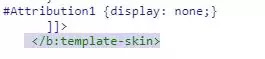
  • After that, a search bar appeared to you enter this code </b:template-skin> and press enter.
  • After that enter this code before this ]]>
  • #Attribution1 {display: none;} 
Powered by blogger removed by CSS code

  • So, Now click on the Save button.

Remove Attribution by removing the code

You can remove the attribution of the blogger from the code itself instead of going back to Layout.
  • Login to Blogger account
  • Navigate to Theme > Edit HTML
  • From the "Jump to widget" select the "Attribution" option (or any other name similar to Attribution such as Attribution 1 etc.)
  • After selecting the "Attribution" option from "Jump to Widget", deleting the entire code between
  • <b:section .... </b:section> that contain "attribution" widget. 
  • click save button

youtube video


UI Style - featured random post slider with/out label

If you want to target a specific post to all your readers, this example may be helpful for you.You can create featured random post with or without specific label.


to do this, you must have jquery installed on your blog.or you can add script tag inside <head> with this :
<script src='http://ajax.googleapis.com/ajax/libs/jquery/1.8.3/jquery.min.js' type='text/javascript'/>
1. edit html
2. add jquery, css, and javascript.
 css :
<link href='https://docs.google.com/uc?id=0B7xJbTAja8i0Q3p2czdZT0VCZ2s&amp;export=download' rel='stylesheet' type='text/css'/>
javascript :
<script src='https://docs.google.com/uc?id=0B7xJbTAja8i0aGZrUEYxajRvQWs&amp;export=download' type='text/javascript'/>

note : if you like you can download css and script above and upload your self to your blog/drive etc whatever you want.

3. add html

press ctrl+f to show search box, then type "<div class='main-wrapper'>" then press enter

copy this html after <div class='main-wrapper'>
<!-- frx Random Post Slider Start -->
<b:if cond='data:blog.pageType != &quot;static_page&quot;'>
<b:if cond='data:blog.pageType != &quot;item&quot;'>
<div id='top-main'>
 <b:section class='main' id='top-main1' preferred='yes'/>
</div>
</b:if></b:if>
<!-- frx Random Post Slider end -->

4. save templates.

5. add widget.

 6. edit widget
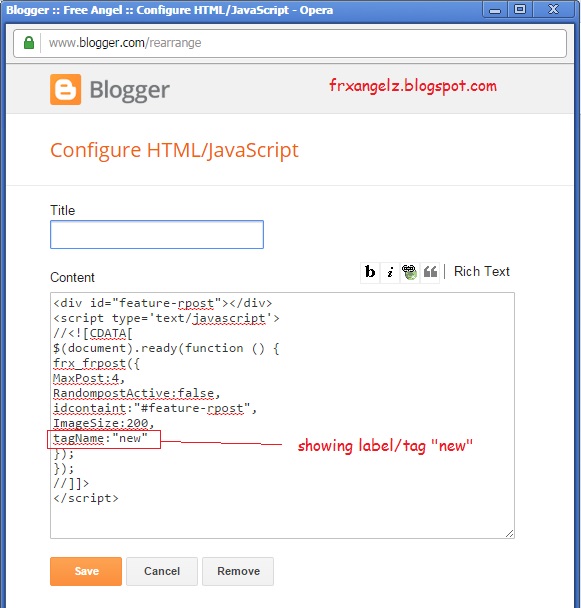
<div id="feature-rpost"></div>
<script type='text/javascript'>
//<![CDATA[
$(document).ready(function () {
frx_frpost({
MaxPost:4,
RandompostActive:false,
idcontaint:"#feature-rpost",
ImageSize:200,
tagName:false
});
});
//]]>
</script>


or you can use label (example label : new)


save and reload your blog.

7. Thanks.

watch this on youtube : 


Random post with specific label - Blogger Widget

If you are looking for a random post widget for blogger then you are right place. This is an example how to add random post widget with specific label.

1. go to blogger dashboard, select template and edit html.


2. search for </head> to add script.
- you may download and upload to your site, or just use this link (no download required)
script
<script src='http://docs.google.com/uc?id=0B7xJbTAja8i0a0ZJbXJ2TkkwSW8&amp;export=download' type='text/javascript'/>


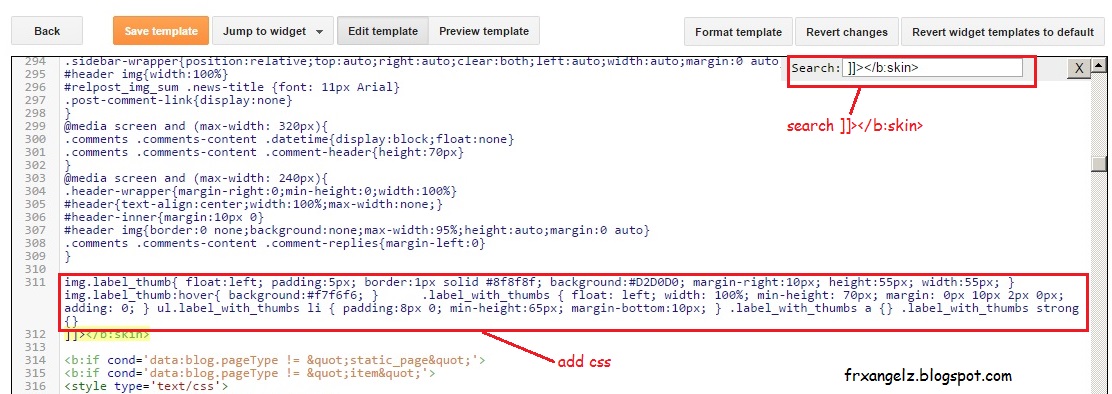
2. search for ]]></b:skin> to add style/css.
img.label_thumb{ float:left; padding:5px; border:1px solid #8f8f8f; background:#D2D0D0; margin-right:10px; height:55px; width:55px; } img.label_thumb:hover{ background:#f7f6f6; } .label_with_thumbs { float: left; width: 100%; min-height: 70px; margin: 0px 10px 2px 0px; adding: 0; } ul.label_with_thumbs li { padding:8px 0; min-height:65px; margin-bottom:10px; } .label_with_thumbs a {} .label_with_thumbs strong {}

2. save template.

3. add a widget.

3. edit widget. at this example i use random post with label "blogger", you must replace it with your label.
<div style="overflow:hidden; width:100%px; height:auto; padding:10px; border:1px dotted #ddd; background-color:#fff"><script type='text/javascript'>var numposts = 4;var showpostthumbnails = true;var displaymore = false;var displayseparator = false;var showcommentnum = false;var showpostdate = false;var showpostsummary = true;var numchars = 50;</script><script type="text/javascript" src="http://frxangelz.blogspot.com/feeds/posts/default/-/blogger?orderby=updated&alt=json-in-script&callback=rpost_thumbs"></script></div>


4. save.

watch video tutorial :

How to Make Any Blogger Widget/Gadget/web element Sticky (float)

Sticky widgets are widgets/gadgets in a webpage which sticks to a specific portion of the page and floats (move) with the up and down scrolling of the page.

At this post I will show you how to make a sticky widget on blogger ( this is just an example, to put on any site can be done with this method, javascript and css included)

1. Get The Widget ID.

    every blogger widget have a specific id. To get this you can go to blogger dashboard then edit a gadget to make it sticky.


2. Add Style

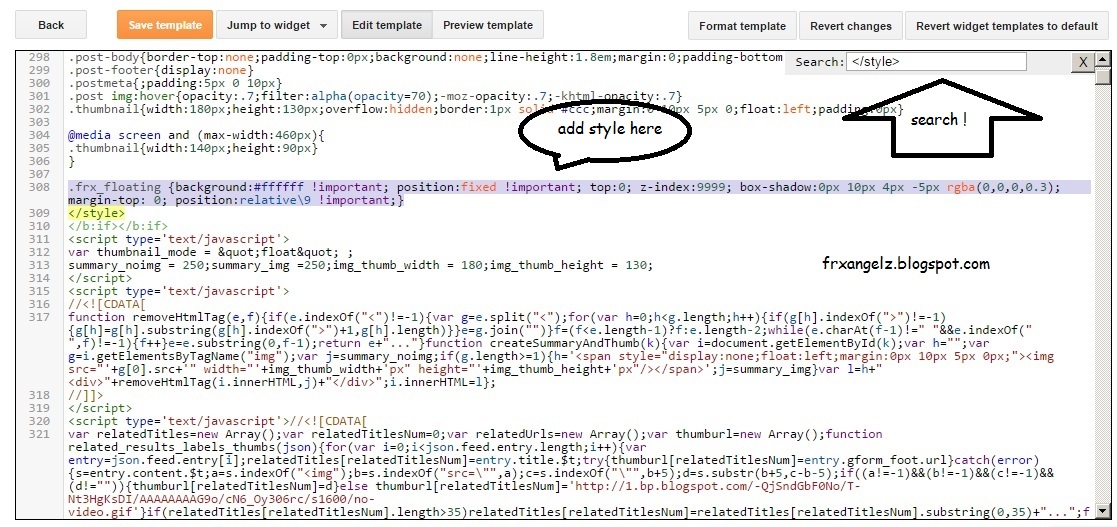
search for </style> add this style :
.frx_floating {background:#ffffff !important; position:fixed !important; top:0; z-index:9999; box-shadow:0px 10px 4px -5px rgba(0,0,0,0.3); margin-top: 0; position:relative\9 !important;}

3. Add this Script :

<script type='text/javascript'>
//<![CDATA[
function frx_make_sticky(element_id) {
    var v_sticky = document.getElementById(element_id);
    var v_scroll = document.createElement("div");
    v_sticky.parentNode.insertBefore(v_scroll, v_sticky);
    var width = v_sticky.offsetWidth;
    var v_Class = v_sticky.className + ' v_sticky';
    window.addEventListener('scroll', v_floating, false);
    function v_floating() {
        var rect = v_scroll.getBoundingClientRect();
        if (rect.top < 0) {
            v_sticky.className = v_Class + ' frx_floating';
            v_sticky.style.width = width + "px";
        } else {
            v_sticky.className = v_Class;
        }
    }
}
//]]>
</script>

4. Go to end of body, search for </body>
call the script :
frx_make_sticky("HTML3");

where "HTML3" is widget ID (replace it with yours)


5. Save Template. 

goto your blogger site and reload/refresh.

here is the video tutorial :

add random youtube video to your web or blogger

watch on youtube

first of all, you must write javascript code like this :


function randomRange(l,h){  var range = (h-l);  var random = Math.floor(Math.random()*range);  if (random === 0){random+=1;}  return l+random;}
function get_random_yid(){        var ids = document.getElementsByClassName("youtube-id");    var idx = randomRange(ids.length,0);    return ids[idx].getAttribute("id");}
function frx_ytb_show(autoPlay){        var videos = document.getElementsByClassName("youtube-frame");      for (var i=0; i<videos.length; i++) {          var youtube = videos[i];          var yid = get_random_yid();        youtube.setAttribute("id", yid);        youtube.style["position"]="relative";          if(autoPlay)           youtube.setAttribute("src",           "https://www.youtube.com/embed/" + youtube.id            + "?autoplay=1&autohide=1&border=0&wmode=opaque&enablejsapi=1");            else            youtube.setAttribute("src",                "https://www.youtube.com/embed/" + youtube.id                 + "?autohide=1&border=0&wmode=opaque");     }}
copy and save to file, or you can download here : 

go to your blogger dashboard or you site html, then add the script:
i use blogger for this example.

1. edit html

2. add script

3. Search </body> 

4. call the script before </body>
set parameter 1 will make script to play youtube video automatically.


5. Add your video-id list (multiple video id)
at this example i use a gadget to put video list.

i also put youtube frame here ( you may put at any places on your web/blogger) 


you can put another youtube frame (viewer) (multiple youtube frame)

How to Remove Credit Link - blogger Template

Actually, these links are attached with some JavaScript or CSS. Finding JavaScript from the template and then removing is too boring and time-consuming also it requires lot’s of effort to do this. But in other hand, you can easily hide the credit/footer link via CSS. This method is very simple, everyone should can do it without troubles.


1. look at the bottom of your blog.


at this article, i use template from ThmeXpose. Another template should be done with the same way.

2. goto blogger dashboard


search for "Template Designed By", comment by add <!-- at the front and add --> at the end. it will look like this <-- / Template Designed By : -->

3. adding style visibility hidden will make it disappear


add style='visibility: hidden' at the <a> element.

4. Save Template, and refresh/reload your blog.
you can watch video tutorial here :

How To get Blogger Total Number of Posts and Comments

You can add the total number of posts and comments as a blogger gadget. In your design page, add an HTML/Java Script gadget, and put in the following code:

<script>
function numberOfPosts(json) {
    document.write('Total Posts: <b>' + json.feed.openSearch$totalResults.$t + '</b><br>');
}
function numberOfComments(json) {
   document.write('Total Comments: <b>' + json.feed.openSearch$totalResults.$t + '</b><br>');
}
</script>
<script src="http://your.blogspot.com/feeds/posts/default?alt=json-in-script&amp;callback=numberOfPosts"></script>
<script src="http://your.blogspot.com/feeds/comments/default?alt=json-in-script&amp;callback=numberOfComments">
</script>

How To Get Your Blog’s Posts

Getting your blog’s posts and displaying them somewhere else is easy. You’ll just have to know how to read an XML file first.

Your Blog’s ID

Each blog has its own ID from which we can get the posts feed. To get your blog’s id simply open up your dashboard and click “New Post”, your blog id will then be visible in the URL.


Blog ID in URL

Add Nivo Image Slider for Blogger Blogspot

Nivo slider is a popular Free Image Slider for web designers. In this article, I will show you how to integrate this to your Blogger / Blogspot template.

Before begin, you must install jQuery first.

1. Add Css

Next, paste below CSS code before ]]></b:skin> in your template code.